Android AI Widgets Are Fast to Make, Hard to Customize
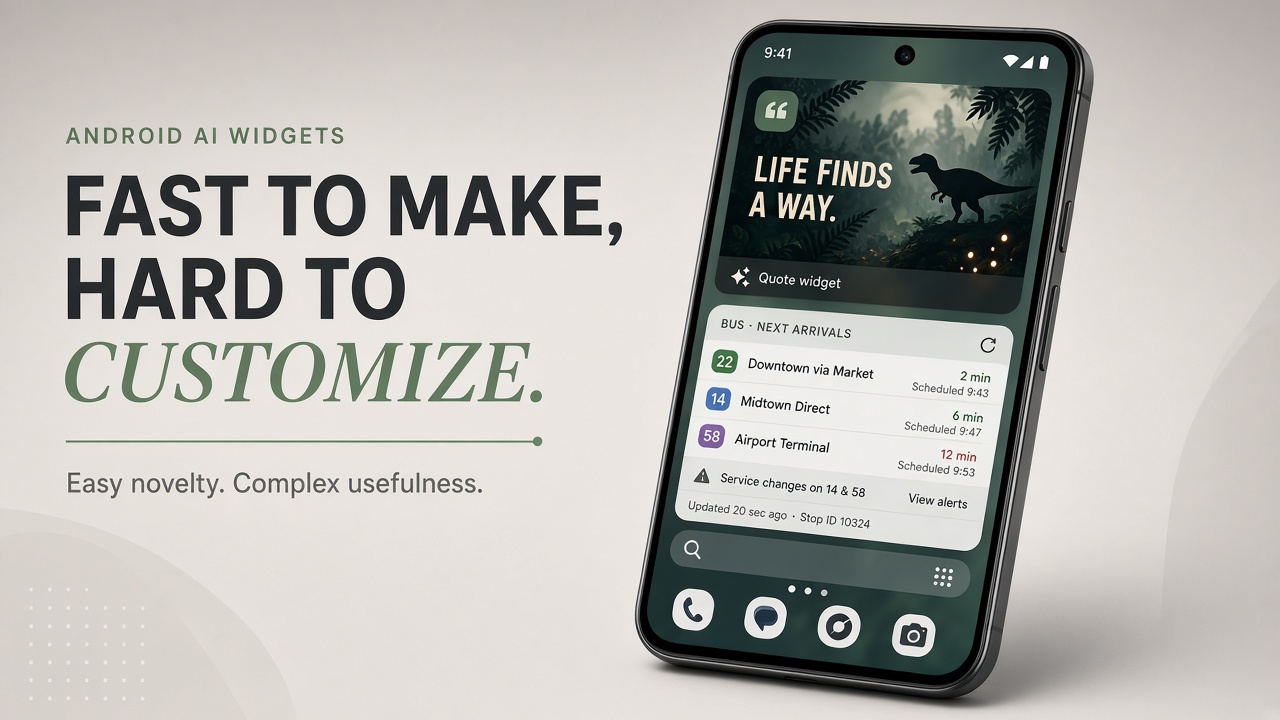
Google’s AI made a Jurassic Park quote widget in about 20 seconds. But when asked for a bus-arrival widget, it produced a wordy schedule response instead of the glanceable live information the tester wanted.
Automation needs a narrow first win
The best first AI workflow is usually a repeated task with a clear input, clear output, and a human approval step.
A Jurassic Park quote widget took about 20 seconds to make with Google’s Android AI widgets feature. That is a quick way to put something playful on a Pixel home screen; it is not yet evidence that AI can produce a useful, customizable mini-app.
Android AI widgets are quick to generate, but mostly use templates
Create My Widget, part of Google’s Gemini Intelligence feature suite, recently began rolling out in beta to Pixel phones. In the source article’s test, it generated a widget that displayed a Jurassic Park quote every hour in about 20 seconds. That speed makes experimentation easy: a user can ask for a small, personal touch without building it by hand.
But the result depends on what the feature actually creates. Many widgets are, in the article’s words, “basically little prompt shortcuts for Gemini.” They open Gemini with a prompt rather than acting as independent tools. Other types rely on predefined templates or Google search results. The feature can produce a widget-shaped interface, but that does not necessarily mean it has made a new app with controls and behavior the user can tailor.
Worth a look
Phugialy Picks

INIU 10000mAh 45W Fast Charging Portable Power Bank
We'd buy this if: You've been caught with a dead phone/laptop away from an outlet more than once.
We'd skip this if: You're always near a charger anyway.

OMOTON C2 Adjustable Aluminum Phone Stand
We'd buy this if: You want your phone upright on your desk for calls/notifications without a cable getting in the way.
We'd skip this if: You never keep your phone on your desk.

Screen Mom Screen Cleaner Spray (16oz)
We'd buy this if: You've been wiping your monitor with your shirt sleeve.
We'd skip this if: You already have a cleaning routine sorted.
Some Phugialy Picks use affiliate links. If you buy through one, Phugialy may earn a commission. It doesn't change what we recommend. Full disclosure →
The bus-arrival test exposes the gap between a widget and a tool
The practical limit appeared when the tester asked for a bus-arrival widget. They wanted real-time arrival information that could be checked at a glance. Instead, the widget returned a wordy, schedule-based response. The source article summed up the mismatch: “Not what I had in mind.”
That distinction matters more than the novelty of generating a widget quickly. A home-screen widget earns its space by making the right information immediately visible or by completing a common action with minimal friction. A response that requires reading through text may be useful in a chat, but it misses the specific job of a glanceable transit display.
For business use, the missing feature is dependable customization
The business case is not established by a fast demo. There is no pricing, time-saved figure, or evidence here that Create My Widget reduces work for a team. My read is that the more relevant test for a business is whether a widget can reliably surface the exact information an employee needs, in the format their routine requires—not whether it can generate a clever interface on demand.
That sets a clear bar before adoption. If a team only wants a playful prompt or a shortcut into Gemini, a lightweight generator may be enough. If the widget is meant to support an operational task—such as checking live status—template-based output and a verbose response can leave the user doing the work elsewhere. The real cost is not just the time to create the widget; it is whether the team has to verify, reinterpret, or replace what it shows.
For now, treat Create My Widget as a convenient way to try simple ideas, not as a substitute for a purpose-built mini-app. The decision should change when it can consistently deliver customized, glanceable information for a real workflow; until then, the 20-second setup is a small convenience, not a productivity case.
Holiday picks
Black Friday: big-ticket buys
The big-ticket day: computers, screens, audio and home upgrades worth waiting for.

Audio
Big purchaseBose QuietComfort Headphones - Wireless Bluetooth Headphones, Active Over Ear Noise Cancelling and Mic, USB-C Charging, Deep Bass, Up to ...
View on Amazon (opens in a new tab): Bose QuietComfort Headphones - Wireless Bluetooth Headphones, Active Over Ear Noise Cancelling and Mic, USB-C Charging, Deep Bass, Up to ...Prices change daily. Check today's price on Amazon.

Home & Kitchen
eufy C28 Robot Vacuum Cleaner and Mop for pet hair, 15,000 Pa
View on Amazon (opens in a new tab): eufy C28 Robot Vacuum Cleaner and Mop for pet hair, 15,000 PaPrices change daily. Check today's price on Amazon.

Home & Kitchen
Keurig K-Elite Single Serve K-Cup Pod Coffee Maker, Brushed Silver
View on Amazon (opens in a new tab): Keurig K-Elite Single Serve K-Cup Pod Coffee Maker, Brushed SilverPrices change daily. Check today's price on Amazon.
We earn from qualifying purchases made through these links, at no extra cost to you, as an Amazon Associate and through other affiliate programs. Disclosure. See all Black Friday picks
Got a question about how this applies to you? →
Keep reading
Follow the thread

AI in Video Games Still Needs More Than a Prompt
A prompt can produce an explorable 3D world. That is not the same as producing a game players will choose—or a business can profitably sell. GTA VI offers a useful counterpoint: its creative process involved years of human experimentation and revision.
Read this noteSame lane, different angle
Local Inference Benchmarking Gets a Public AMD Dashboard
A public llama.cpp dashboard makes AMD inference results inspectable and reusable. Its measurements are useful, but they answer a narrower question than a universal performance ranking.
AI Data Center Readiness Is Becoming a Neocloud Filter
Nvidia is signaling support for AI data centers only when they are nearly ready to operate. That changes the practical question for neoclouds: how much of the land, power, and building work is already real?